
Automation for Salaried Staff
Manage salaried employee payroll with automatic tracking of contracted days, absences, and adjustments based on fixed annual salary.
How automation works
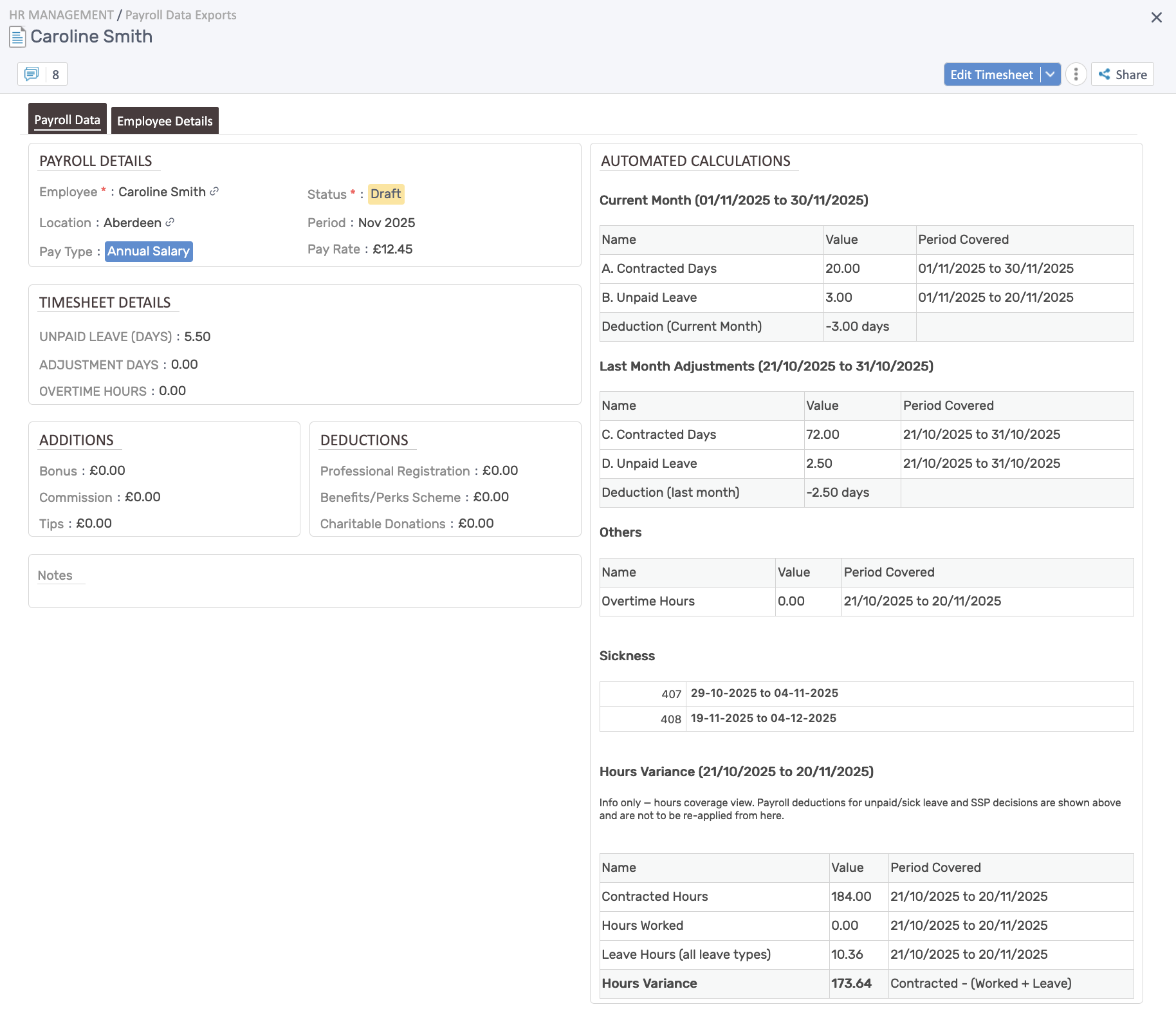
Section titled “How automation works”For salaried employees, the system tracks days rather than hours:
- Current month: Contracted days and unpaid leave taken
- Last month adjustments: Reconciles contracted days paid vs. unpaid leave actually taken
- Deductions: Automatically calculates days to deduct based on unpaid absences
- Overtime: Tracked separately (typically not applicable for salaried staff)
- Sickness: Leave records displayed with date ranges
Current month calculations
Section titled “Current month calculations”Formula: Deduction (Current Month) = B - A (shown as days)
- A. Contracted Days: Working days in the month based on working pattern
- B. Unpaid Leave: Unpaid leave days taken in the current month (up to current date)
If unpaid leave exceeds contracted days, it shows as a negative deduction.
Last month adjustments
Section titled “Last month adjustments”Formula: Deduction (last month) = D - C (shown as days)
- C. Contracted Days: Working days from last month
- D. Unpaid Leave: Actual unpaid leave taken last month
This ensures any unpaid leave taken after the previous payroll cut-off is reconciled in the current month.
Hours variance (informational)
Section titled “Hours variance (informational)”The system also shows an hours coverage view for reference:
- Contracted Hours: Total hours scheduled based on working pattern
- Hours Worked: Actual timesheet entries (if tracked)
- Leave Hours: All leave types taken
- Hours Variance:
Contracted - (Worked + Leave)
Note: This is informational only. Payroll deductions for unpaid/sick leave and SSP decisions are based on the day calculations above, not from the hours variance.
Additions & deductions
Section titled “Additions & deductions”Track extra payments and deductions:
- Additions: Bonus, Commission, Tips
- Deductions: Professional Registration, Benefits/Perks Scheme, Charitable Donations
Sickness tracking
Section titled “Sickness tracking”Sickness records are displayed with:
- Leave request ID
- Date range of sickness absence
- Used for SSP (Statutory Sick Pay) calculations by payroll team
Quick tips
Section titled “Quick tips”- Set accurate contracted days/working patterns in employee records.
- Review unpaid leave records before payroll to ensure deductions are correct.
- Check last month adjustments to reconcile any absences taken after the previous payroll cut-off.
- Use additions/deductions for bonuses or one-off payments.