
Automation for Hourly Staff
Automatically calculate pay for hourly staff using rota schedules and timesheets, with built-in overtime, breaks, and rate calculations.
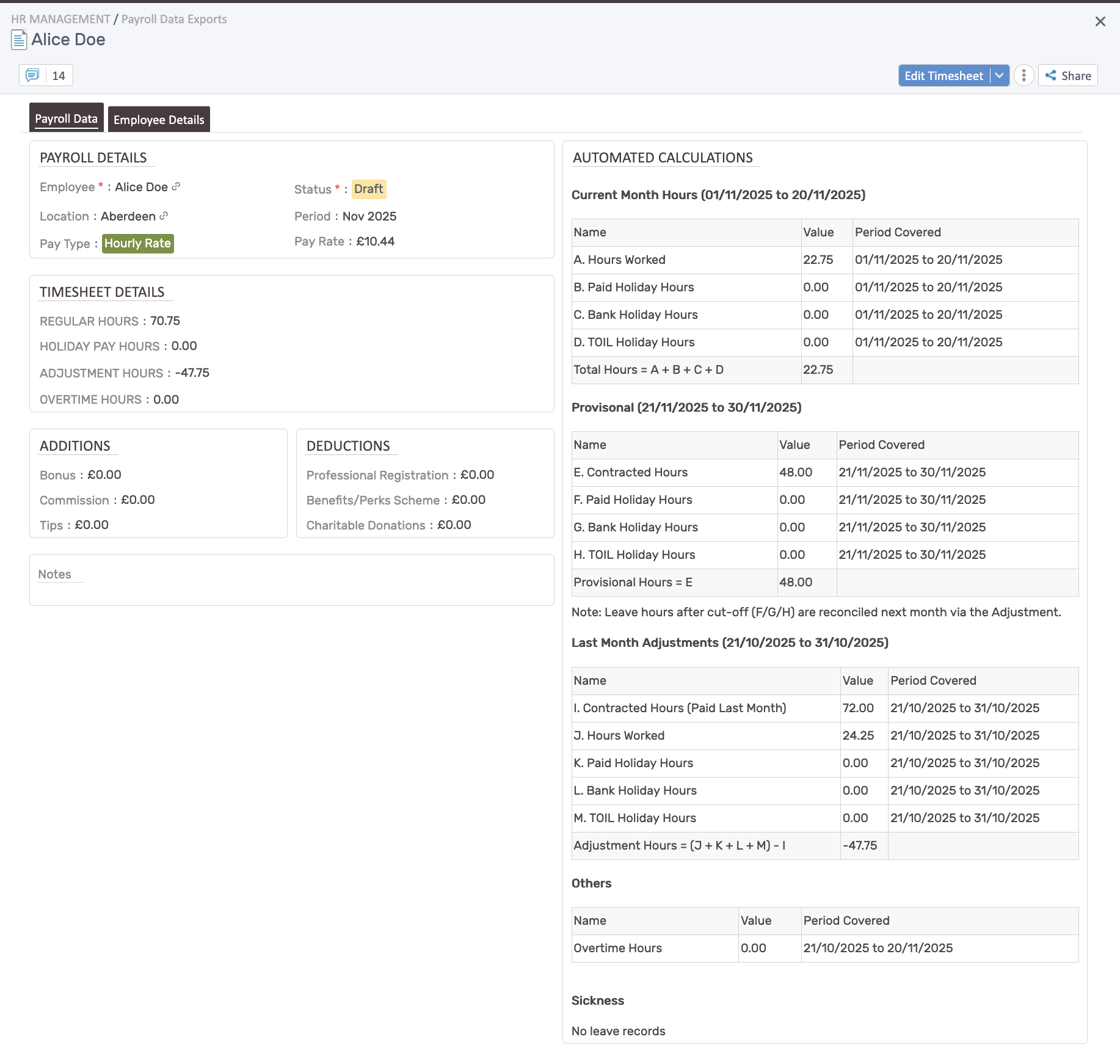
How automation works
Section titled “How automation works”For hourly employees, the system automatically calculates:
- Current month hours: Hours worked, paid holiday hours, bank holiday hours, TOIL holiday hours
- Provisional hours: Contracted hours from rotas, paid holiday hours, bank holiday hours, TOIL holiday hours
- Last month adjustments: Reconciles contracted hours paid vs. hours actually worked, plus holiday hours
- Overtime: Tracked separately in the “Others” section
- Sickness: Leave records displayed for reference
Current month calculations
Section titled “Current month calculations”Formula: Total Hours = A + B + C + D
- A. Hours Worked: Actual timesheet entries for the current period
- B. Paid Holiday Hours: Approved paid leave taken
- C. Bank Holiday Hours: Statutory bank holidays falling in the period
- D. TOIL Holiday Hours: Time off in lieu taken as holiday
Provisional hours (future planning)
Section titled “Provisional hours (future planning)”Formula: Provisional Hours = E
- E. Contracted Hours: Hours scheduled on the rota from current date to month end
- F. Paid Holiday Hours: Approved future paid leave
- G. Bank Holiday Hours: Upcoming bank holidays
- H. TOIL Holiday Hours: Planned TOIL usage
Leave hours after cut-off (F/G/H) are reconciled next month via the Adjustment.
Last month adjustments
Section titled “Last month adjustments”Formula: Adjustment Hours = (J + K + L + M) - I
- I. Contracted Hours (Paid Last Month): What was provisionally paid
- J. Hours Worked: What was actually worked
- K. Paid Holiday Hours: Actual paid leave taken
- L. Bank Holiday Hours: Bank holidays that occurred
- M. TOIL Holiday Hours: TOIL actually used
This adjustment ensures employees are paid correctly for the previous month’s actual hours vs. what was provisionally paid from the rota.
Additions & deductions
Section titled “Additions & deductions”Track extra payments and deductions:
- Additions: Bonus, Commission, Tips
- Deductions: Professional Registration, Benefits/Perks Scheme, Charitable Donations
Quick tips
Section titled “Quick tips”- Ensure timesheets are approved before payroll export.
- Review adjustment hours each month to catch over/underpayments from previous period.
- Configure overtime thresholds to match your policies.
- Verify hours worked matches timesheet entries before finalizing.