
Viewing Timesheets
The Time Tracker app allows you to view your recorded work hours, compare them against your scheduled shifts, and monitor your timesheet history.
From the home screen, tap TIME TRACKER to view your timesheets.
Timesheet List View
Section titled “Timesheet List View”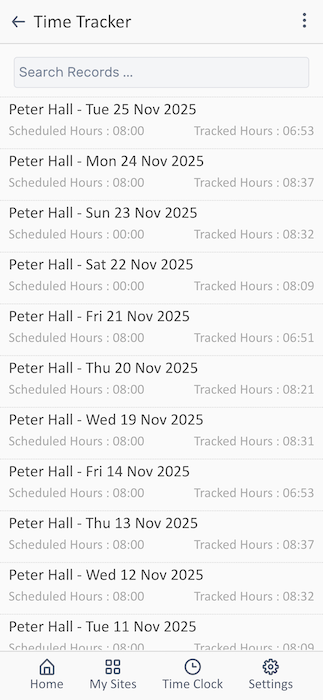
The Time Tracker displays a chronological list of your work days with detailed hour tracking.
Understanding Your Timesheet Entries
Section titled “Understanding Your Timesheet Entries”Each timesheet entry shows:
-
Name and Date - Your name followed by the date
- Format: Name - Day DD Mon YYYY
- Example: “Peter Hall - Tue 25 Nov 2025”
-
Scheduled Hours - The hours you were expected to work
- Example: “Scheduled Hours : 08:00”
-
Tracked Hours - The actual hours you worked (clocked in/out)
- Example: “Tracked Hours : 06:53”
Related Features
Section titled “Related Features”- Time Clock - How to clock in and out correctly
- Viewing Your Rota - Check your scheduled hours
- Requesting Time-Off - How absence affects timesheets