
Time Clock
The Time Clock feature lets you record your work hours by clocking in when you start your shift and clocking out when you finish.
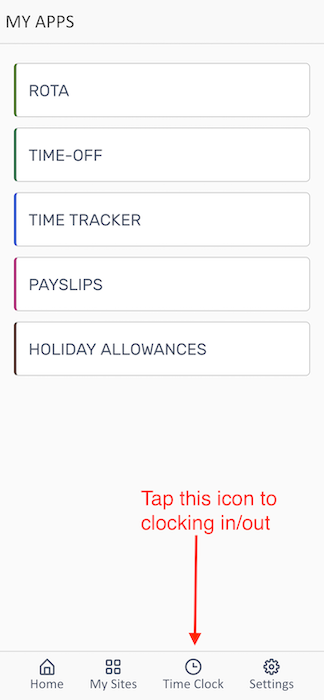
The Time Clock is always accessible from the bottom navigation bar. Tap the clock icon to open the time tracking interface.
Clocking In/Out with QR Code
Section titled “Clocking In/Out with QR Code”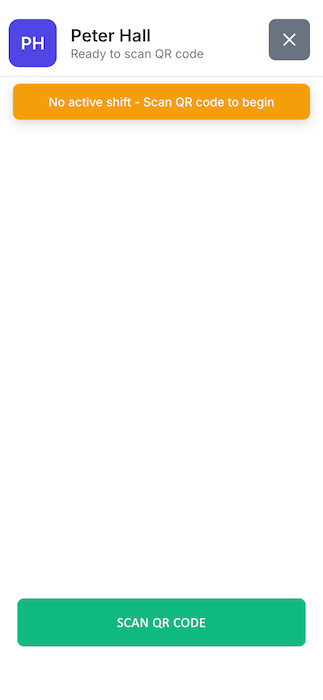
How to Clock In
Section titled “How to Clock In”- Open the Time Clock from the bottom navigation bar
- Tap SCAN QR CODE button
- Point your phone camera at the QR code displayed at your workplace
- The app will automatically register your clock-in time
How to Clock Out
Section titled “How to Clock Out”- At the end of your shift, open Time Clock again
- Tap SCAN QR CODE
- Scan the same workplace QR code
- Your shift will be recorded with the clock-out time
Video Guide
Section titled “Video Guide”Watch this quick video guide to learn how to clock in and out using the mobile app:
Troubleshooting
Section titled “Troubleshooting””You are not nearby any known location” error message displayed
Section titled “”You are not nearby any known location” error message displayed”- Make sure you have GPS location enabled for the app
- Ensure you have a stable internet connection
- Try closing and reopening the app
- Verify your account is active
QR Code Won’t Scan
Section titled “QR Code Won’t Scan”- Ensure your camera lens is clean
- Hold your phone steady and at the correct distance
- Make sure there’s adequate lighting
- Check that camera permissions are enabled for the app
Related Features
Section titled “Related Features”- Viewing Your Rota - Check your scheduled shifts
- Viewing Timesheets - Review your recorded hours