
Contract Amendments
Overview
Section titled “Overview”Contract amendments let you apply effective-dated changes to an employee’s terms (pay, hours, days, role, working pattern, time-off policy) while preserving history. Apps like rotas and holiday calculations use the effective date to apply the right working pattern and pro‑rata allowances for overlapping periods.
When to use
Section titled “When to use”- Salary or hourly rate changes (mid-year or backdated).
- Contracted hours/days changes that affect scheduling and timesheets.
- Role changes that drive different pay or patterns.
- Working pattern changes that must take effect on a specific date.
- Time-off policy changes that recalc entitlement from the effective date.
Create a contract amendment
Section titled “Create a contract amendment”- Go to Employee Management → Employee Directory, search the employee, open their record.
- Click Add Contract (or New Contract / Contract Amendment).
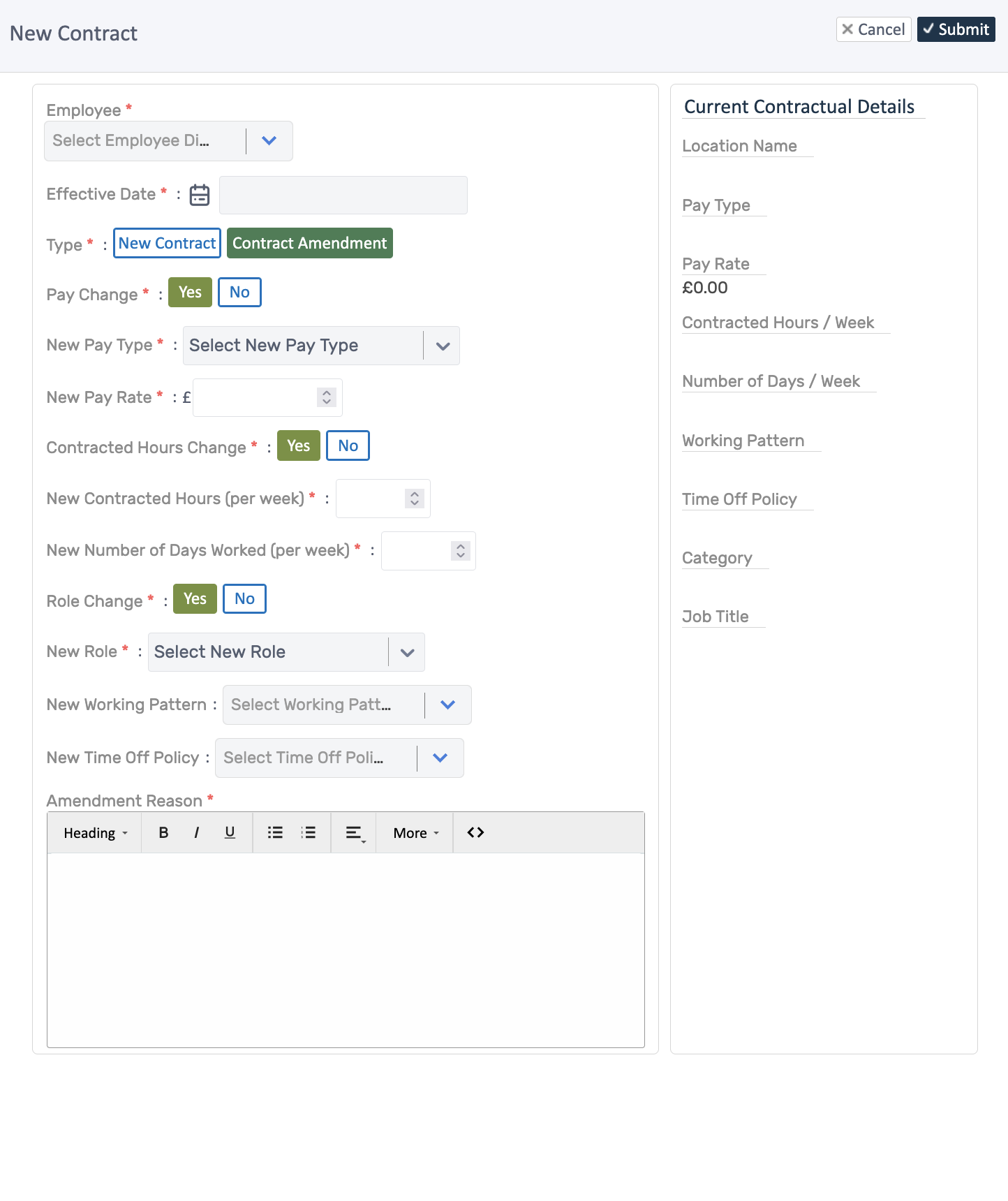
- Set Effective Date — this drives which pattern/pay applies for each period.
- Choose Type: keep New Contract for initial hire; pick Contract Amendment for changes.
- Toggle what’s changing:
- Pay Change → pick new pay type and rate.
- Contracted Hours Change → enter new weekly hours and days.
- Role Change → select the new role.
- Working Pattern → select new pattern.
- Time Off Policy → select new policy.
- Add an Amendment Reason (what/why/when).
- Review the Current Contractual Details panel (right) to see the existing values.
- Click Submit. The history is stored; future-dated entries will apply from their effective date.
How it’s used downstream
Section titled “How it’s used downstream”- Rotas/Timesheets: pulls the working pattern that covers the date of the shift or timesheet, handling overlaps cleanly.
- Leave: applies the time-off policy that is active on the request date; pro‑rata allowances follow the effective date.
- Payroll: uses the pay rate and contracted hours/days that are effective for the payroll period.
Good practice
Section titled “Good practice”- Use one amendment per effective date; avoid stacking overlapping changes on the same date.
- Enter clear reasons so audits show what changed and why.
- Double-check working pattern and policy selections before submitting—these drive allowance and scheduling changes.
Related Topics
Section titled “Related Topics”- Employee Management - Core concepts
- Managing Records - Update employee information
- Document Management - Store employee documents
- Adding Employees - Create new employee records
Next Steps
Section titled “Next Steps”After setting up contracts:
- Add employee documents like certifications
- Update employment information to match contract